


IMU/VRU haute performance équipée d'un accéléromètre et de deux gyroscopes Triaxiaux entièrement calibrés et à compensation thermique.
Boîtier en aluminium usiné avec précision, adapté à des applications telles que la stabilisation, la robotique mobile, l'Orientation de l'antenne et la surveillance de l'utilisation.

3DM-GX5-AR
Certificates and Approvals
| Document | type | langue |
|---|---|---|
| 3DM-GX5 Declaration of Conformity (EU) | Déclaration de Conformité | English |
| 3DM-GX5 Declaration of Conformity (UK) | Déclaration de Conformité | English |
| Document | type |
|---|---|
| 3DM-GX5 (Small) CAD File | CAD Step Files |
| MicroStrain 5-Series Inertial Sensor Firmware | Firmware |
| propriété | valeur |
|---|---|
| Type | Inertial (IMU) |
| Performance Grade | High Performance Grade |
| Random Walk | Accel: 20 µg/√Hz, Gyro: 0.3 °/√hr |
| Bias Instability (Gyroscope) | 8 °/hr |
| Bias Instability (Accelerometer) | 40 μg |
| Hysteresis | Accel bias: 4.8 mg, Accel gain: 300 PPM, Gyro bias: 0.12 °/s, Gyro gain: 300 PPM |
| Communication Port Type | Micro D9 |
| Communication Interface | RS-232, USB |
| Update Rate | IMU: 1000 Hz, EKF: 500 Hz |
| Inputs/Outputs | 2xGPIO |
| Weight | 16.5 g |
| Weight | 0.582 oz |
| Size | 36.0 mm x 36.6 mm x 11.1 mm |
| Size | 1.42 in x 1.44 in x 0.43 in |
| Power Consumption | 0.5 W |
| Input Voltage | 4.0 V to 36.0 V |
| Minimum Operating Temperature | -40 °C |
| Maximum Operating Temperature | 85 °C |
| Minimum Operating Temperature | -40 °F |
| Maximum Operating Temperature | 185 °F |
| MTBF | 557280 h |
| Sensing Range (Accelerometer) | 2 g, 8 g, 4 g, 20 g, 40 g |
| Sensing Range (Gyroscope) | 300 °/s, 75 °/s, 150 °/s, 900 °/s |
| Sensing Range (Pressure) | 1260 mbar |
| Accuracy | Roll/Pitch (static): 0.25 ° |
| Ingress Protection Rating | Not Rated |
| Housing Material | Aluminum |
| Software | MSCL, ROS, SensorConnect |
| Mounting Style | Screw Down, Precision Alignment |
List of accessories available for all variants of this family
| Product Code | Description |
|---|---|
 6212-3001
|
RS232 CABLE KIT FOR AHRS/IMU |
 6212-3004
|
USB CABLE KIT FOR AHRS/IMU |
 6224-0100
|
MICRO DB9/LEADS |
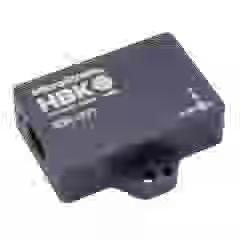
Découvrez le 3DM-GV7-AR amélioré - notre IMU/VRU robuste de nouvelle génération avec des performances améliorées et des fonctionnalités avancées.
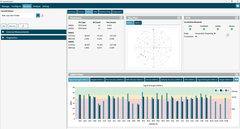
InertialConnect is the latest software solution for MicroStrain inertial sensors. With InertialConnect, you can easily configure your sensors, adjust parameters, upgrade firmware, and deploy preconfigured parameter files. You can also verify sensor outputs with intuitive visualizations, including times eries data, position data, and statuses.
InertialConnect is compatible with both PC desktop and Linux operating systems, making it your go-to solution for precision and efficiency in inertial sensor management.

SensorConnect is the next generation in desktop sensing software.
From configuration of nodes and starting networks, to collecting and analyzing data in real-time, SensorConnect provides a modern, powerful experience with our Wireless, Inertial, and Displacement products.
Using our intelligent data collection and graphing algorithms, you are able to visualize massive amounts of data instantly, and then zoom in on points of interest just as fast.
Built in MathEngine functionality allows for both real-time and post-processed math, such as generating FFTs, averages, RMS, etc.

SensorCloud is a unique sensor data storage, visualization, and remote management platform that leverages powerful Cloud computing technologies to provide excellent data scalability, rapid visualization, and user programmable analysis.
MicroStrain sensors can instantly upload their data to SensorCloud via an ethernet-connected WSDA-2000. Once uploaded, your data is securely stored in the Cloud and can be accessed from anywhere, or downloaded for offline use.
Configurable alerts can be set to help notify you of real-time event in your data.
MathEngine allows you to perform analytics on your data, all in the Cloud. Pre-built functions are available for ease of use, while IPython Notebooks allow advanced users to write custom scripts to be run on their data once, or on a schedule.
The MicroStrain Communication Library (MSCL) is our open-sourced API that simplifies writing code to interact with our sensors. MIP SDK is a lightweight C/C++ library for interacting with MicroStrain G and C-series products via baremetal and resource constrained microcontrollers.
Both APIs are readily available and fully-documented on GitHub, featuring valuable tools such as full documentation, example code, and a quick start guide.