


3DM-GX5-GNSS/INS 올인원 내비게이션 솔루션은 GPS, GLONASS, BeiDou 및 Galileo 위성군을 활용하는 고성능 통합 다중 위성 GNSS 수신기를 특징으로 합니다.
센서 측정값은 완벽하게 보정되고 온도 보정을 거쳤으며 정확한 출력을 위해 직교 좌표계에 수학적으로 정렬되었습니다. 뛰어난 선형성을 지닌 센서 성능과 자동 적응형 추정 필터 알고리즘은 실제 동적 환경에서도 매우 정확한 계산 결과를 도출합니다.
3DM-GX5-GNSS/INS
다중 위성 수신기는 최대 32개의 위성을 추적합니다.
최대 500Hz까지 조절 가능한 샘플링 속도
CNC 아노다이징 알루미늄
Certificates and Approvals
| Document | Type | Language |
|---|---|---|
| 3DM-GX5 Declaration of Conformity (EU) | Declaration of Conformity | English |
| 3DM-GX5 Declaration of Conformity (UK) | Declaration of Conformity | English |
| Document | Type |
|---|---|
| 3DM-GX5 (Large) CAD File | CAD Step Files |
| MicroStrain 5-Series Inertial Sensor Firmware | Firmware |
| Property | Value |
|---|---|
| Type | Inertial Navigation (INS) |
| Performance Grade | High Performance Grade |
| Features | Accelerometer, Gyroscope, Magnetometer |
| Random Walk | Accel: 20 µg/√/Hz, Gyro: 0.3 °/√hr |
| Bias Instability (Gyroscope) | 8 °/hr |
| Bias Instability (Accelerometer) | 40 μg |
| Hysteresis | Accel bias: 4.8 mg, Accel gain: 300 PPM, Gyro bias: 0.12 °/s, Gyro gain: 300 PPM |
| Communication Port Type | Micro D9 |
| Communication Interface | RS-232, USB |
| Update Rate | IMU: 1000 Hz, EKF: 500 Hz, GNSS: 4 Hz |
| Inputs/Outputs | 3xGPIO |
| Weight | 20 g |
| Weight | 0.705 oz |
| Size | 44.2 mm x 36.6 mm x 11.1 mm |
| Size | 1.74 in x 1.44 in x 0.44 in |
| Power Consumption | 0.7 W |
| Input Voltage | 4.0 V to 36.0 V |
| Minimum Operating Temperature | -40 °C |
| Maximum Operating Temperature | 85 °C |
| Minimum Operating Temperature | -40 °F |
| Maximum Operating Temperature | 185 °F |
| MTBF | 396193 h |
| GNSS Constellations | GPS/QZSS, GLONASS, Galileo, BeiDou |
| GNSS Frequency Bands | L1C/A, L10F, E1B/C, B1 |
| Sensing Range (Accelerometer) | 2 g |
| Sensing Range (Gyroscope) | 75 °/s |
| Sensing Range (Magnetometer) | 8 Gauss |
| Sensing Range (Pressure) | 1260 mbar |
| Accuracy | Roll/Pitch (static): 0.25 °, Heading (static): 0.8 °, Position (static): 2m horizontal, 5m vertical |
| Ingress Protection Rating | Not Rated |
| Housing Material | Aluminum |
| Software | MSCL, ROS, SensorConnect |
| Mounting Style | Screw Down, Precision Alignment |
List of accessories available for all variants of this family
| Product Code | Description |
|---|---|
 6212-3000
|
RS232/GNSS CABLE & ANTENNA KIT |
 6212-3002
|
USB/GNSS CABLE & ANTENNA KIT |
 6224-0100
|
MICRO DB9/LEADS |
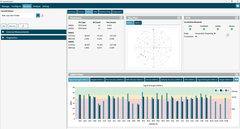
InertialConnect is the latest software solution for MicroStrain inertial sensors. With InertialConnect, you can easily configure your sensors, adjust parameters, upgrade firmware, and deploy preconfigured parameter files. You can also verify sensor outputs with intuitive visualizations, including times eries data, position data, and statuses.
InertialConnect is compatible with both PC desktop and Linux operating systems, making it your go-to solution for precision and efficiency in inertial sensor management.

SensorConnect is the next generation in desktop sensing software.
From configuration of nodes and starting networks, to collecting and analyzing data in real-time, SensorConnect provides a modern, powerful experience with our Wireless, Inertial, and Displacement products.
Using our intelligent data collection and graphing algorithms, you are able to visualize massive amounts of data instantly, and then zoom in on points of interest just as fast.
Built in MathEngine functionality allows for both real-time and post-processed math, such as generating FFTs, averages, RMS, etc.

SensorCloud is a unique sensor data storage, visualization, and remote management platform that leverages powerful Cloud computing technologies to provide excellent data scalability, rapid visualization, and user programmable analysis.
MicroStrain sensors can instantly upload their data to SensorCloud via an ethernet-connected WSDA-2000. Once uploaded, your data is securely stored in the Cloud and can be accessed from anywhere, or downloaded for offline use.
Configurable alerts can be set to help notify you of real-time event in your data.
MathEngine allows you to perform analytics on your data, all in the Cloud. Pre-built functions are available for ease of use, while IPython Notebooks allow advanced users to write custom scripts to be run on their data once, or on a schedule.

The MicroStrain Communication Library (MSCL) is our open-sourced API that simplifies writing code to interact with our sensors. MIP SDK is a lightweight C/C++ library for interacting with MicroStrain G and C-series products via baremetal and resource constrained microcontrollers.
Both APIs are readily available and fully-documented on GitHub, featuring valuable tools such as full documentation, example code, and a quick start guide.